WhatsApp Payments API

Use the WhatsApp Payments API to send order details, collect payments through UPI or supported payment gateways, update customers on order status, and retrieve payment status.

Availability and prerequisites

This solution is available only in India. Use an Indian bot phone number with the +91 country code.

Before you send a payment message:

  1. Provide the required details to RML:
    • Bot phone number with the +91 country code.
    • WhatsApp Business Account ID (WABA ID) for that number.
  2. Request a test account from the payment gateway (PG) you want to test.
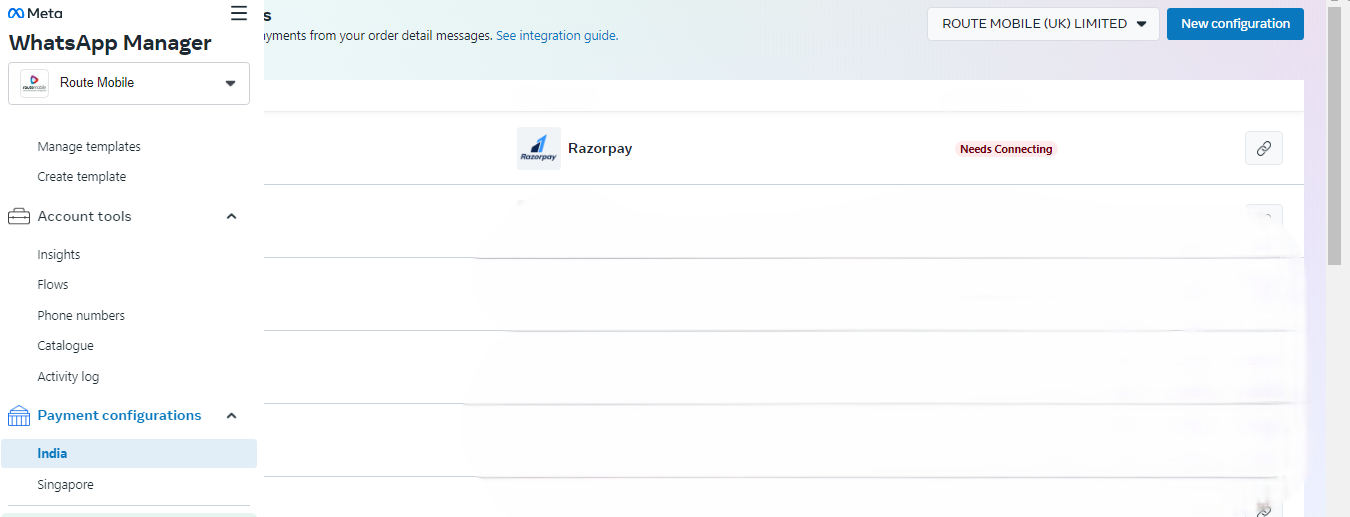
  3. In Facebook Manager, open Payment Methods for the required WABA.
  4. Start account linking by selecting Add a direct pay method. If this option is unavailable, contact RML for configuration help.
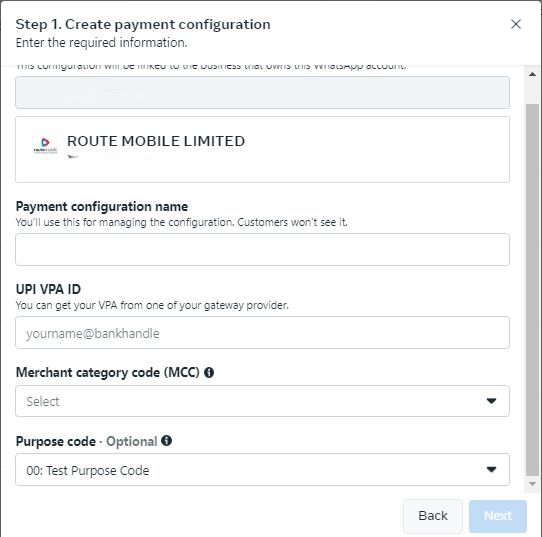
  1. Enter a payment configuration name and record it. You use this value as the Payment Config ID.
  2. Enter the UPI VPA ID.
  3. Set MCC to 000.
  4. Set the Purpose code to 00.
  5. Select Payment Gateway when prompted to choose a PG.
  6. Log in to the PG website and authorize WhatsApp Payments India to access the PG account. You need a WhatsApp user's phone number as the test user.

After you complete these steps, the payment method name is your Payment Config ID.

Payment flows

UPI payment flow

Use this flow when customers can pay natively in WhatsApp or through another UPI app.

  1. The customer sends an order containing selected products to your business.
  2. Send an order details message to the customer.
  3. The customer selects View Details, then Pay Now.
  4. After your payment gateway or payment service provider confirms payment, process the order.

Endpoint details

FieldValue
URLhttps://apis.rmlconnect.net/wba/v1/messages
MethodPOST
Content-Typeapplication/json

Request body

{
  "phone": "+919916655196",
  "enable_acculync": false,
  "body": "this is your text",
  "footer": "this is your text",
  "image": {
    "url": "https://upload.wikimedia.org/wikipedia/commons/3/3f/JPEG_example_flower.jpg"
  },
  "payment": {
    "reference_id": "ref1231112",
    "payment_configuration": "RMLUAT11",
    "order_type": "order_details",
    "product_type": "digital-goods",
    "address": {
      "first_name": "first name of recipient",
      "address_line1": "address",
      "address_line2": "address",
      "city": "city",
      "state": "state",
      "country": "India",
      "postal_code": "560066"
    },
    "items": [
      {
        "retailer_id": "retailer_id as per fb",
        "catalog_id": "catalog_id",
        "product_name": "Product name, for example bread",
        "amount": 10.5,
        "quantity": "1",
        "expiration_timestamp": "1719319609",
        "expiration_description": "expiration-explanation"
      }
    ],
    "subtotal_amount": 10.5,
    "discount_amount": 0,
    "discount_description": "optional_text",
    "shipping_amount": 0,
    "shipping_description": "optional_text",
    "total_amount": 10.5,
    "tax_amount": 0,
    "tax_description": "optional_text"
  },
  "extra": "samplepayment"
}
Other payment modes

Use this flow when customers pay through payment gateway options such as credit cards, debit cards, mobile wallets, or online payment services.

  1. The customer sends an order containing selected products to your business.
  2. Send an order details message to the customer.
  3. The customer selects Review and Pay.
  4. The customer selects Continue and chooses an available payment option.

Endpoint details

FieldValue
URLhttps://apis-nextgen.rmlconnect.net/wba/v1/messages
MethodPOST
Content-Typeapplication/json

Request body

{
  "phone": "+918109321009",
  "enable_acculync": false,
  "body": "this is your text",
  "footer": "this is your text",
  "image": {
    "url": "https://upload.wikimedia.org/wikipedia/commons/3/3f/JPEG_example_flower.jpg"
  },
  "payment": {
    "reference_id": "12345567",
    "order_type": "order_details",
    "product_type": "digital-goods",
    "payment_gateway": {
      "type": "Razorpay",
      "configuration_name": "RPcards"
    },
    "address": {
      "first_name": "first name of recipient",
      "address_line1": "address",
      "city": "city",
      "state": "state",
      "country": "India",
      "postal_code": "560066"
    },
    "items": [
      {
        "retailer_id": "1-1135-2742-HI",
        "product_name": "Coragen - 10 ML",
        "amount": 10,
        "quantity": "1",
        "expiration_timestamp": "1721910192",
        "expiration_description": "expiration-explanation"
      }
    ],
    "subtotal_amount": 10,
    "discount_description": "optional_text",
    "shipping_amount": 0,
    "shipping_description": "optional_text",
    "total_amount": 10,
    "tax_amount": 0,
    "tax_description": "optional_text"
  },
  "extra": "samplepayment"
}

Payment gateway fields

FieldRequiredDescription
payment_gateway.typeYesSet to Razorpay or PayU when you have linked that payment gateway to accept payments.
payment_gateway.configuration_nameYesName of the pre-configured payment configuration. Must match the payment configuration in WhatsApp Business Manager and must not exceed 60 characters.

Shared request fields

Top-level fields

FieldRequiredDescription
phoneYesMobile number for the payment message recipient.
enable_acculyncNoEnables Acculync URL shortening.
bodyYesMessage body. Emojis and markdown are supported. Maximum length: 1024 characters.
footerYesFooter text. Emojis, markdown, and links are supported. Maximum length: 60 characters.
imageNoCustom image displayed to the user. When you use image, the items array is limited to 10 items and cannot be used with retailer_id or catalog_id.
paymentYesPayment details for the order.
extraNoAdditional payment message value.

payment object

FieldRequiredDescription
reference_idYesUnique order or invoice identifier. Case-sensitive; cannot be empty; may contain English letters, numbers, underscores, dashes, and dots; maximum 35 characters. Use a unique value for each order_details message. For multiple messages for the same order, add a sequence number such as BM345A-12.
payment_configurationRequired for UPI flowPayment configuration for the order sent in an order_details message.
payment_gatewayRequired for other payment modesGateway configuration. See the payment gateway fields in the other payment modes flow.
order_typeYesTransaction or purchase information, including item names, quantities, and delivery details.
product_typeYesProduct type, such as digital-goods, clothing and apparel, electronics, or home appliances.
addressYesRecipient or shipping address.
itemsYesOrder line items.
subtotal_amountYesTotal charges before discounts, taxes, and additional fees.
discount_amountNoAmount deducted as a price reduction.
discount_descriptionNoDiscount description. Maximum length: 60 characters.
shipping_amountYesShipping cost.
shipping_descriptionNoShipping details.
total_amountYesTotal amount to be paid, for example ₹12.34.
tax_amountYesTax amount added to the total bill.
tax_descriptionNoDescription of the tax obligation.

address object

FieldRequiredDescription
first_nameYesName of the recipient or business receiving physical goods.
address_line1YesShipping address, such as door or tower number and street name.
address_line2NoShipping address details, such as landmark or area.
cityYesRecipient city.
stateYesRecipient state.
countryYesRecipient country.
postal_codeYesSix-digit shipping address ZIP code.

items array

FieldRequiredDescription
retailer_idNoContent ID for an order item from your catalog.
catalog_idNoFacebook catalog identifier used by the business. If you do not provide this field, provide country_of_origin, importer_name, and importer_address inside the item object.
product_nameYesProduct name that identifies the item.
amountYesAmount value for the item. The source examples use values such as ₹12.34.
quantityYesNumber of items in the order. This value must be an integer and cannot be decimal.
expiration_timestampNoUTC expiration timestamp in seconds. Minimum threshold: 300 seconds.
expiration_descriptionNoExpiration explanation. Maximum length: 120 characters.

Order details enhancements

Use these enhancements when you need to guide customers toward a preferred gateway payment option, add gateway-specific data, send a direct UPI deep link, or update an existing order.

Template order details with a preferred payment method

Send the order_details payment experience through an approved WhatsApp message template. In this flow, the payment payload is nested in the media.payment array.

Endpoint details

FieldValue
URLhttps://apis.rmlconnect.net/wba/v1/messages?debug=True
MethodPOST
Content-Typeapplication/json

Request example

{
  "phone": "+918106867392",
  "enable_acculync": false,
  "media": {
    "type": "media_template",
    "template_name": "testing_order_details_template_test1",
    "lang_code": "en_US",
    "payment": [
      {
        "reference_id": "12114121444788s39ti7",
        "order_type": "order_details",
        "product_type": "digital-goods",
        "payment_gateway": {
          "type": "razorpay",
          "configuration_name": "RPcards",
          "notes": {
            "udf1": "ud"
          },
          "preferred_payment_methods": [
            {
              "method": "gpay"
            }
          ]
        },
        "address": {
          "first_name": "first name of recipient",
          "address_line1": "address",
          "address_line2": "address",
          "city": "city",
          "state": "state",
          "country": "India",
          "postal_code": "560066"
        },
        "items": [
          {
            "name": "test language",
            "product_id": "1062993161405574",
            "quantity": 1,
            "amount": 10,
            "retailer_id": "1-1135-2742-HI",
            "country_of_origin": "ORIGIN_COUNTRY",
            "importer_name": "IMPORTER_NAME",
            "importer_address": {
              "address_line1": "IMPORTER_ADDRESS",
              "city": "CITY",
              "country_code": "COUNTRY",
              "postal_code": "534280"
            }
          }
        ],
        "subtotal_amount": 10,
        "discount_amount": 0,
        "shipping_amount": 0,
        "shipping_description": "optional_text",
        "total_amount": 10,
        "tax_amount": 0,
        "tax_description": "optional_text"
      }
    ]
  },
  "extra": "samplepayment"
}

Template-driven fields

FieldRequiredDescription
media.typeYesFixed value: media_template.
media.template_nameYesName of the pre-approved WhatsApp message template.
media.lang_codeYesTemplate language code, for example en_US.
media.paymentYesArray containing the order_details payload. The source example contains one item.

Catalog-linked item additions

FieldRequiredDescription
nameConditionalItem display name used in this template variant.
product_idConditionalCatalog product identifier for the item.
country_of_originConditionalRequired when catalog_id is not supplied at the order level.
importer_nameConditionalRequired with country_of_origin when catalog_id is not supplied.
importer_addressConditionalObject containing address_line1, city, country_code, and postal_code.
Interactive order details with a preferred payment method

Use preferred_payment_methods inside payment_gateway to guide the customer toward a specific payment option at checkout.

Endpoint details

FieldValue
URLhttps://apis.rmlconnect.net/wba/v1/messages?debug=True
MethodPOST
Content-Typeapplication/json

Request example

{
  "phone": "+918106867392",
  "enable_acculync": false,
  "body": "this is your text",
  "footer": "this is your text",
  "image": {
    "url": "https://upload.wikimedia.org/wikipedia/commons/3/3f/JPEG_example_flower.jpg"
  },
  "payment": {
    "reference_id": "h1234u56798",
    "order_type": "order_details",
    "product_type": "digital-goods",
    "payment_gateway": {
      "type": "payu",
      "configuration_name": "PUcards",
      "preferred_payment_methods": [
        {
          "method": "cred"
        }
      ]
    },
    "address": {
      "first_name": "first name of recipient",
      "address_line1": "address",
      "city": "city",
      "state": "state",
      "country": "India",
      "postal_code": "560066"
    },
    "items": [
      {
        "retailer_id": "1-1135-2742-HI",
        "product_name": "Coragen - 10 ML",
        "amount": 10,
        "quantity": "1",
        "expiration_timestamp": "1803241876",
        "expiration_description": "expiration-explanation"
      }
    ],
    "subtotal_amount": 10,
    "discount_description": "optional_text",
    "shipping_amount": 0,
    "shipping_description": "optional_text",
    "total_amount": 10,
    "tax_amount": 0,
    "tax_description": "optional_text"
  },
  "extra": "samplepayment"
}

payment_gateway additions

FieldRequiredDescription
notesNoFree-form key-value object passed through to the gateway as UDFs. The source shows notes.udf1 with Razorpay.
preferred_payment_methodsNoArray of method objects that guides the customer toward a payment option at the gateway.
preferred_payment_methods[].methodNoPayment method identifier. Observed values are gpay for Razorpay and cred for PayU.
Interactive order details with a UPI intent link

Send a direct UPI deep link instead of a configured payment gateway.

Endpoint details

FieldValue
URLhttps://apis.rmlconnect.net/wba/v1/messages?debug=True
MethodPOST
Content-Typeapplication/json

Request example

{
  "phone": "+918106867392",
  "enable_acculync": false,
  "body": "this is your text",
  "footer": "this is your text",
  "image": {
    "url": "https://upload.wikimedia.org/wikipedia/commons/3/3f/JPEG_example_flower.jpg"
  },
  "payment": {
    "reference_id": "wy0SkiTmxDDkfekhiykfyttDDDt2",
    "order_type": "order_details",
    "product_type": "digital-goods",
    "upi_intent_link": {
      "link": "upi://pay?pa=merchant_vpa&pn=merchant%20Name&mc=mc_code&purpose=purpose_code&tr=transaction_record"
    },
    "address": {
      "first_name": "first name of recipient",
      "address_line1": "address",
      "city": "city",
      "state": "state",
      "country": "India",
      "postal_code": "560066"
    },
    "items": [
      {
        "retailer_id": "1-1135-2742-HI",
        "product_name": "Coragen - 10 ML",
        "amount": 10,
        "quantity": "1",
        "expiration_timestamp": "1799885016",
        "expiration_description": "expiration-explanation"
      }
    ],
    "subtotal_amount": 10,
    "discount_description": "optional_text",
    "shipping_amount": 0,
    "shipping_description": "optional_text",
    "total_amount": 10,
    "tax_amount": 0,
    "tax_description": "optional_text"
  },
  "extra": "samplepayment"
}

UPI intent fields

FieldRequiredDescription
upi_intent_linkConditionalUse in place of payment_gateway to route payment through a merchant-generated UPI deep link.
upi_intent_link.linkYesStandard UPI deep link URI with merchant VPA, name, MCC, purpose code, and transaction reference parameters.
Implementation notes
  • The template-driven example uses media.payment as a single-element array, while interactive examples use payment as an object.
  • The source shows payment_gateway.notes only for Razorpay. Support and expected structure for other gateways are not documented here.
  • The only observed preferred_payment_methods[].method values are gpay and cred. Confirm additional values with gateway-specific integration documentation.
  • The source does not show upi_intent_link and payment_gateway together. Treat their combined use as unconfirmed.

Order status

Send an order_status message to update a customer about an order previously sent through the order_details flow. Use the same reference_id to associate the status update with the original order.

Send an order status message

Endpoint details

FieldValue
URLhttps://apis.rmlconnect.net/wba/v1/messages
MethodPOST
Content-Typeapplication/json

Request body

{
  "phone": "+918109321009",
  "enable_acculync": false,
  "body": "this is your text",
  "footer": "this is your text",
  "image": {
    "url": "https://upload.wikimedia.org/wikipedia/commons/3/3f/JPEG_example_flower.jpg"
  },
  "payment": {
    "product_type": "digital-goods",
    "order_type": "order_status",
    "reference_id": "ref1231234",
    "order_status": "processing",
    "order_status_description": "optional-text"
  },
  "extra": "samplepayment"
}

Order status fields

FieldRequiredDescription
product_typeYesProduct type, such as digital-goods, clothing and apparel, electronics, or home appliances.
order_typeYesSet to order_status.
reference_idYesUnique identifier for the original order or invoice.
order_statusYesStatus of the order: processing, partially_shipped, shipped, completed, or canceled.
order_status_descriptionNoStatus-related information, useful for cancellations. Maximum length: 120 characters.

Payment status

Use the payment configuration ID and transaction reference ID to check whether the customer has completed a payment.

Fetch payment status

Request

curl --location 'https://apis.rmlconnect.net/wba/reports/v1/fetch-payment-status?payment_configuration=PayU_PG&transaction_reference_id=AMC0000001003' \
--header 'Authorization: {{jwt_auth_token}}'

Response

{
  "payment_configuration": "PayU_PG",
  "transaction_reference_id": "AMC0000001003",
  "currency": "INR",
  "status": "failed",
  "value": 90005,
  "offset": 100,
  "id": "7720118028101585",
  "type": "payu",
  "created_timestamp": "2024-04-05T12:33:25",
  "updated_timestamp": "2024-04-05T12:33:25"
}

BillDesk payment gateway integration

Use this flow to send WhatsApp payment messages through BillDesk. Configure the Payment Configuration Name in the Meta Business Account for the sending WABA before using this request.

BillDesk request example

Endpoint details

FieldValue
URLhttps://apis.rmlconnect.net/wba/v1/messages
MethodPOST
AuthorizationJWT bearer token scoped to the sending WABA/account
Content-Typeapplication/json

Request body

{
  "phone": "+{{end_user_phone_number}}",
  "enable_acculync": false,
  "body": "{{body_text}}",
  "footer": "{{footer_text}}",
  "type": "payment",
  "image": {
    "url": "{{image_media_url}}"
  },
  "payment": {
    "reference_id": "{{reference_id}}",
    "order_type": "order_details",
    "product_type": "digital-goods",
    "items": [
      {
        "retailer_id": "{{retailer_id}}",
        "product_name": "{{product_name}}",
        "amount": {{amount_of_items}},
        "quantity": "{{quantity_of_items}}",
        "expiration_timestamp": "{{expiration_timestamp}}",
        "expiration_description": "{{expiration_description}}"
      }
    ],
    "subtotal_amount": {{subtotal_amount}},
    "discount_description": "{{discount_description}}",
    "shipping_amount": {{shipping_amount}},
    "shipping_description": "{{shipping_description}}",
    "total_amount": {{total_amount}},
    "tax_amount": {{tax_amount}},
    "tax_description": "optional_text",
    "address": {
      "first_name": "first name of recipient",
      "address_line1": "address",
      "city": "city",
      "state": "state",
      "country": "India",
      "postal_code": "560066"
    },
    "payment_gateway": {
      "type": "billdesk",
      "configuration_name": "{{payment_configuration_name_for_BillDesk}}",
      "billdesk": {
        "additional_info1": "{{additional_info1-value}}",
        "additional_info2": "{{additional_info2-value}}",
        "additional_info3": "{{additional_info3-value}}",
        "additional_info4": "{{additional_info4-value}}",
        "additional_info5": "{{additional_info5-value}}",
        "additional_info6": "{{additional_info6-value}}",
        "additional_info7": "{{additional_info7-value}}"
      }
    }
  },
  "extra": "{{extra_for_sample_payment_message}}"
}
BillDesk field reference

Top-level fields

FieldTypeRequiredNotes
phonestringYesE.164 number with a + prefix.
enable_acculyncbooleanYesSet to false for the BillDesk flow shown in the sample.
bodystringYesMessage body text.
footerstringYesMessage footer text.
typestringYesFixed value: payment.
image.urlstringYesPublicly accessible media URL for the payment card image.
extrastringNoFree-form passthrough field.

payment object fields

FieldTypeRequiredNotes
reference_idstringYesMerchant-side unique order or transaction reference.
order_typestringYesFixed value: order_details.
product_typestringYesFor example, digital-goods.
items[]arrayYesAt least one line item.
subtotal_amountnumberYesSum of item amounts before tax and shipping.
discount_descriptionstringNoDiscount description.
shipping_amountnumberYesUse 0 if not applicable.
shipping_descriptionstringNoShipping details.
total_amountnumberYesFinal payable amount.
tax_amountnumberYesUse 0 if not applicable.
tax_descriptionstringNoTax description.
addressobjectYesRecipient shipping or billing address.
payment_gatewayobjectYesBillDesk gateway configuration.

BillDesk gateway fields

FieldTypeRequiredNotes
payment_gateway.typestringYesMust be billdesk.
payment_gateway.configuration_namestringYesPayment Configuration Name provisioned in the Meta Business Account for this WABA.
payment_gateway.billdeskobjectYesMandatory container for BillDesk UDF fields.
billdesk.additional_info1stringYesMandatory arbitrary string. The request fails if it is omitted.
billdesk.additional_info2 to billdesk.additional_info7stringNoAdditional BillDesk UDF fields.
BillDesk responses and validation

200 OK

{
  "message": "message received successfully",
  "status": "processing",
  "request_id": "799c8216-6afd-11f1-9f4f-0242ac130021"
}

400 Bad Request — additional_info1 missing

{
  "message": "please check API docs for more info",
  "status": "failed",
  "reason": {
    "payment": {
      "payment_gateway": {
        "billdesk": "additional_info1 is mandatory"
      }
    }
  }
}

400 Bad Request — billdesk object missing

{
  "message": "please check API docs for more info",
  "status": "failed",
  "reason": {
    "payment": {
      "payment_gateway": {
        "billdesk": "You need to pass the billdesk json object in body for payment_gateway billdesk"
      }
    }
  }
}

Implementation notes

  • Omitting payment_gateway.billdesk returns a distinct 400 error from omitting additional_info1.
  • The source only confirms that additional_info1 is mandatory. Validation behavior for additional_info2 through additional_info7 is not documented.
  • The source does not document validation behavior for an invalid configuration name, gateway type values other than billdesk, multiple or zero items, retry behavior, idempotency, rate limits, or payment status webhooks.

Did this page help you?