
SMPP Gateway Manual Page
Introduction
Connect to the RouteMobile Messaging Platform using SMPP v3.4, with backward compatibility for SMPP v3.3.
The RouteMobile Messaging Platform uses the SMPP v3.4 Protocol Specification Issue 1.5. It is also designed to be backward compatible with SMPP v3.3.
This document should be read together with the SMPP v3.4 Specification v1.5 and assumes familiarity with SMPP functionality.
Use
interface_versionvalue0x34if your client application connects using SMPP v3.4. If the application uses SMPP v3.3, optional fields cannot be used.
Connectivity
Clients can connect to the Route Mobile Messaging Platform server multiple times. This is useful when you need to deploy multiple applications simultaneously.
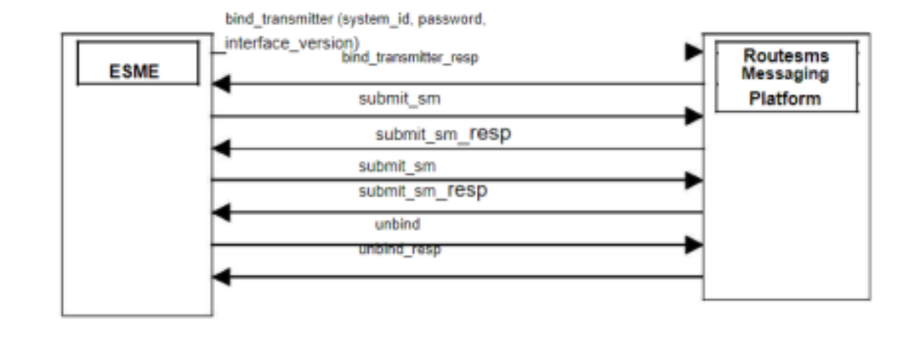
To connect to the Route Mobile Messaging Platform, configure the following parameters:
| Parameter | Description | Required value or behavior |
|---|---|---|
| IP Address and Port | TCP/IP endpoint where the ESME connects to the Route Mobile Messaging Platform. | Use the assigned IP address and port. |
system_id | Username of your account configured on the RouteMobile Messaging Platform. | Use your configured account username. |
| Password | Password for the account. This prevents unauthorized access to your account. | Use the password for the configured account. |
system_type | This field is not used by RouteMobile. | Set to null. |
interface_version | Defines the SMPP version used by the client application. | Set to 0x34 or 52 decimal for SMPP v3.4. If not set for SMPP v3.4, the platform assumes SMPP v3.3. |
enquire_link | Keeps the connection active when it is not in use. | Send an enquire_link every minute. Links inactive for more than 5 minutes are automatically disconnected. |
Updated 4 months ago