
Configuration
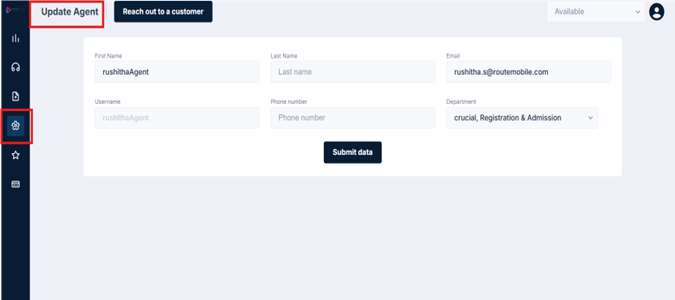
The Configuration section is where you manage your agent profile. It's a straightforward screen — think of it as your personal details page. Keep this information accurate and up to date, as it's tied to your account on the platform.
Updating Your Profile
Click on the Configuration icon on the left navigation panel to open the Update Agent screen. You'll see the following fields:
| Field | Description |
|---|---|
| First Name | Your first name as registered on the platform |
| Last Name | Your last name |
| The email address linked to your account — this is also where password reset emails are sent | |
| Username | Your login username. This is not editable |
| Phone Number | Your contact number |
| Department | The team or department you belong to, as configured by your administrator |
Once you've made your changes, click Submit Data to save.
Updated 3 months ago
Did this page help you?