
TSP Self-Serve Portal for Onboarding
I. TSP onboarding on META:
- Register yourself as a TSP on META and complete the below steps:
II. Create a Partner Solution:
- A partner solution is an asset sharing relationship between two partners — a Tech Provider (or Tech Partner) and a Solution Partner. Solutions are initiated, accepted, and managed in the App Dashboard > WhatsApp > Partner Solutions panel.
- Initiate an email to [email protected] for RML APP ID and send the request to us.
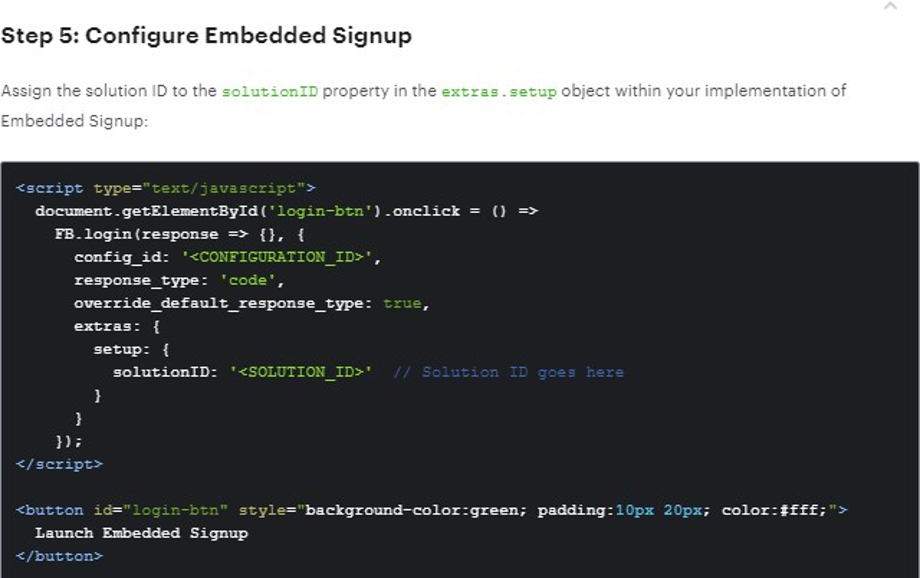
- Once a solution has been accepted, partners can use the (solution ID) to customize the Embedded Signup flow and onboard customers.
III. Onboard the TSP/ISV on RML:
- Sales manager needs to create an ODOO ID and Global user with Rates and routing for the TSP/ISV and complete all the onboarding, agreements with TSP for at least one user.
- Here RMLUAT11 ODOO ID: XXXXXXX
- We have made RMLUAT11 as your parent login so login via that.
- Staging Link to login: https://rnd.rmlconnect.net/unified-ui-v2/#/login
- Once approved, then a tick box on ROUTEPOD needs to be given to send ISV portal access for accessing a portal for ISVs.
IV. Onboard end clients of TSP:
-
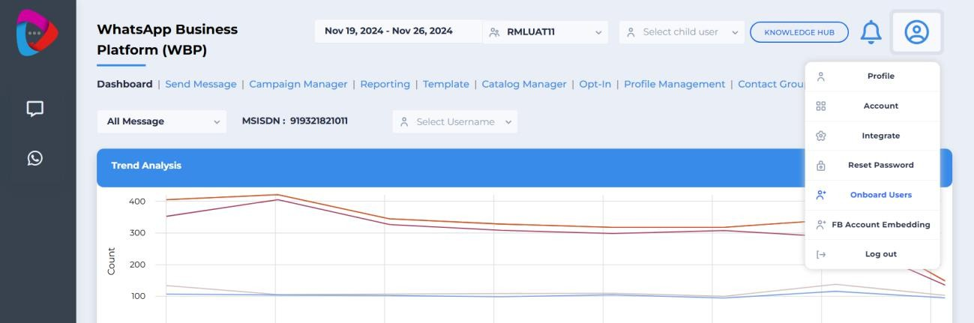
Navigate to the Onboard Sign Up page in the ISV portal.
-
After clicking “Onboard Users” you will need to fill in the fields with the basic information of the client that the ISV wants to onboard. The client's information required to generate a global username is provided below.
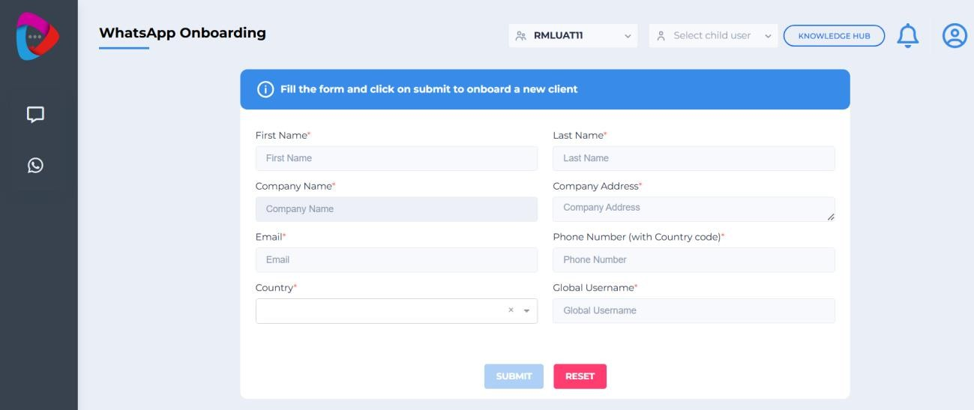
- Name and Surname
- Legal Company Name
- Legal Company Address
- Official Email
- Official Phone Number
- Country (show pricing region specific)
- GlobalUsernamelob
-
Click Submit to successfully create the user.
-
Keep the Global Username handy, as it will be required for future reference or login purposes.
-
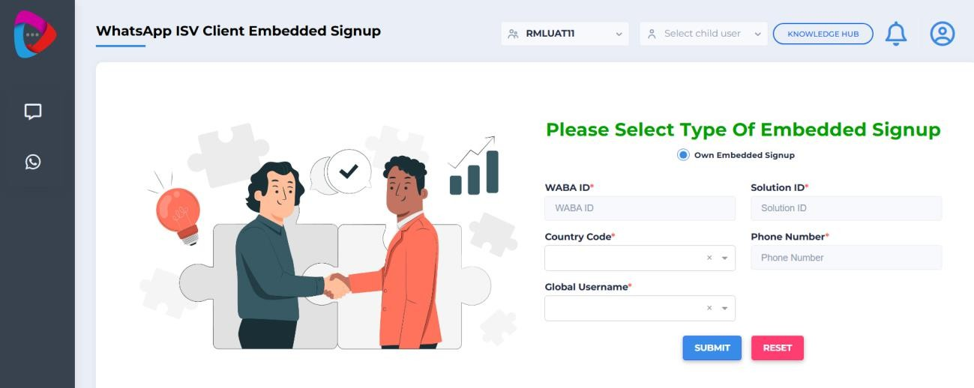
Once the onboarding process is complete, proceed to the FB Account Embedding page for ISV client signup.
-
Enter the details WABA ID, solution ID, country code, brand phone number, and global username.
-
Enter the same global username that was used during the onboarding process.
-
-
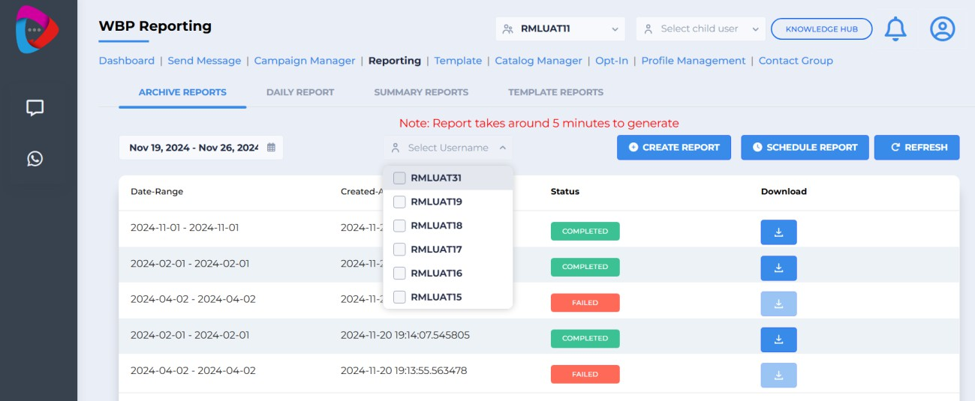
You can also access the reporting section to view all reports for different usernames by selecting the dropdown button.
-
At this stage a new Global user needs to be created at the back end and a mailer needs to go to BM, product-desk, [email protected] with the commercials set that are chosen below.
-
Pricing option to choose for Global User:
- If main ISV is on post paid then all the other global users also on postpaid.
- Same commercials are per ISV agreement/GLobal user1 then it is automated.
- If not, the GLobal user form to fill the the pricing details for the new end client will open up and routing needs to be manually added in step .5
-
Next step is for ISV to onboard the end client either by :
- ISVs own Embedded Sign Up
- RML Embedded Sign up
V. Own Embedded Sign up:
-
Option to fill in the below details of the onboarded customer:
- Global User Name
- WABA ID
- Phone Number
- Solution ID
-
Steps currently done by OPS to sync the onboarded WABA ID that needs to be automated:
- Login to facebook account.
- Click on whatsapp accounts - Search for WABA ID in facebook Account.
- Assign People ( Facebook 4 people access).
- Edit Settings in facebook Account.
- Timezone,GBP, credit line payment method add manually.
- Login to RML Admin panel.
- Click on Onboarding process.
- Search for Global username - Click on cloud registration.
- Put WABA id - brand phone number - Submit.
- RML Admin portal- Click on BMS.
- Add Routing as per commercial or.
- Clone Routing if ISV shares main account user.
- RML Admin portal - Client mgt.
- Give WBS panel access - Submit.
- Once all completed then credentials need to go to ISV.
- Portal to show all onboarded customers on ISV portal and their consumption.
- Login to facebook account.
VI. RML Embedded Sign up for ISVs:
-
Documentation to build TSP embedded sign up: https://developers.facebook.com/docs/whatsapp/multi-partner-solutions
-
Once th entire embedded process is completed as per the above step then credentials need to go out to customer.
VII. Dashboard
- Onboarded clients with reporting available.
Note for BMs: All active service charges on the parent account will be fetched in the child account by default at the time of billing. To avoid this, BM can manually remove the additional services from the child account in ROUTEPOD.
EX – Monthly Recurring Costs, Chatbot Costs, Live Agent Costs etc. if any.
Updated 11 days ago