
Ratings & Reviews
The Ratings & Reviews module gives you a view of the feedback customers have left after their conversations with you. It's your personal score card — a straightforward way to understand how customers are experiencing their interactions and where there may be room to improve.
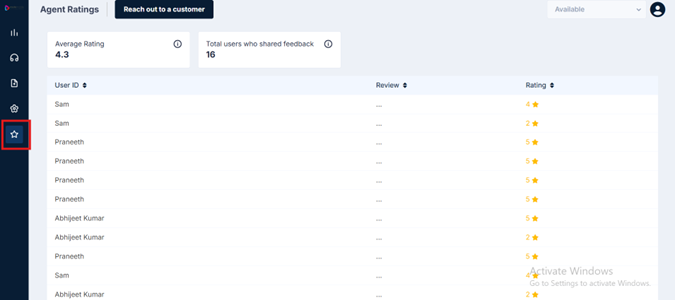
What You See on This Screen
At the top of the screen, two summary cards give you an instant overview:
-
Average Rating — Your overall average score based on all customer feedback received. Ratings are on a scale of 1 to 5 stars.
-
Total Users Who Shared Feedback — The total number of customers who submitted a rating or review.
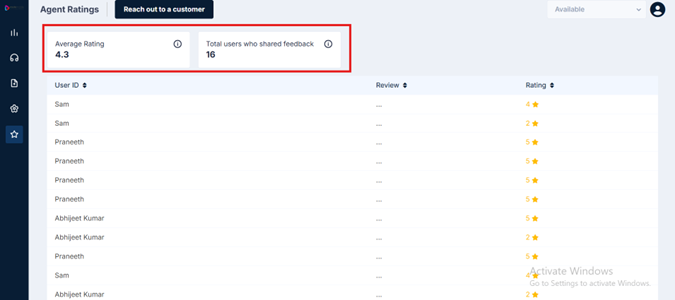
Below the summary cards, you'll find a detailed list of all individual feedback entries, with three columns:
| Column | What It Shows |
|---|---|
| User ID | The name or identifier of the customer who left the feedback |
| Review | Any written comment the customer submitted alongside their rating |
| Rating | The star rating given by the customer, from 1 to 5 |
Viewing Individual Review Details
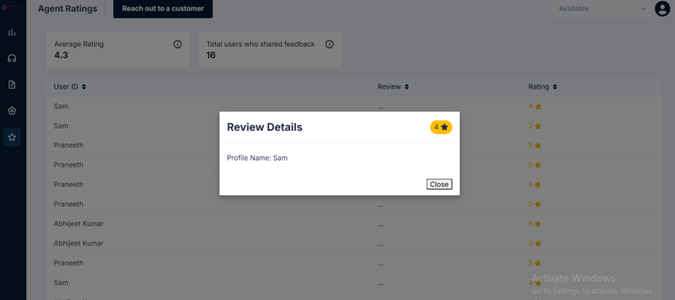
To view more details on any entry, click anywhere on the row — across the User ID, Review, or Rating columns. A Review Details popup appears showing:
- The profile name of the customer who submitted the feedback
- The review details, if the customer has submitted a written response
- The star rating given by the customer
Click Close to dismiss the popup and return to the list.
How Ratings Work
Ratings are submitted by customers at the end of a conversation — triggered automatically once a chat is resolved. The customer receives a feedback prompt directly in the chat window, asking them to rate their experience on a scale of 1 to 5 stars.
As an agent, you don't need to do anything to collect them. They come in on their own.
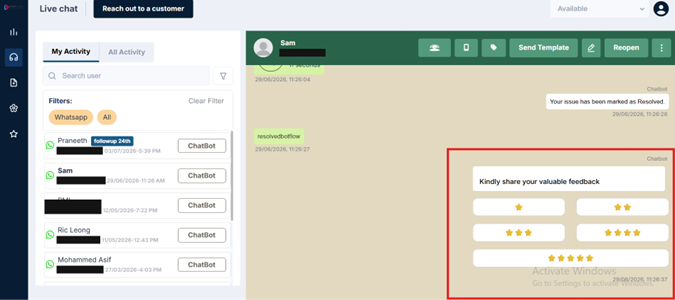
You can view your ratings but cannot edit or delete them. This ensures feedback remains an honest, unaltered record of the customer experience.
Updated 3 months ago