
Overview
WhatsApp Business Messaging (WBM)
Enable Conversational Commerce through rich and engaging conversations.
Create a transforming experience for your customers by connecting one-on-one in their most preferred channel. Today, customers have high expectations for customer service — they want to stay connected throughout their journey, expecting real-time support from consideration through post-purchase. They look for seamless conversations and faster resolutions.
Features

Types of WhatsApp Messages
There are two fundamental message categories on WhatsApp Business Platform: user-initiated (the customer starts the thread) and business-initiated (the brand starts the thread using a pre-approved template).
User-initiated messages
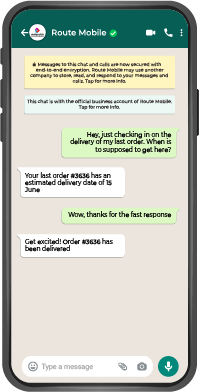
No opt-in required
- No prior opt-in is required.
- The customer initiates a message thread by sending a message to the business.
- Responses incur no charge within 24 hours of the customer's message.
Types:
- Session Text
- Session Media
Business-initiated messages
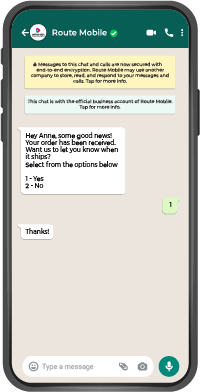
Opt-in is mandatory
- Prior opt-in is mandatory.
- The brand initiates a message thread by messaging the customer with a pre-approved template.
- Pricing is based on per message sent.
Types:
- Text Template
- Media Template
- Quick Reply / Call to Action Template
Interactive templates
Call to Action
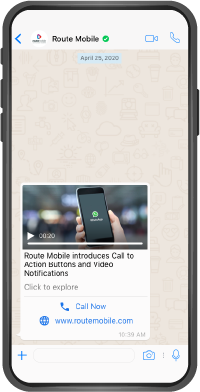
Create up to two buttons that let users respond to your message or take an action.
| Button type | Behavior |
|---|---|
| Contact number | Static |
| Website | Static or Dynamic |
Common uses: Quick, one-touch access to a brand's info, e-business card, etc.
Quick Reply
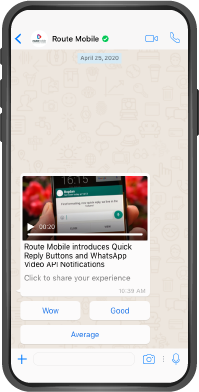
Create up to three buttons that let a user respond to your message or take an action.
- 3 customizable clickable buttons (Dynamic Text)
Common uses: Surveys, feedback, ratings, polls, etc.
Quality Rating and Rate Limit Tier
Quality Rating
Your WhatsApp Business Account Quality Rating reflects the message quality your customers experienced in the past 24 hours.
There are three quality states:
If your Quality Rating reaches a low state, account status will be first:
Flagged
Reached low state
Restricted
Reach your messaging Limit
Messaging Limit Tiers
Message limit tiers affect both new and existing conversations.
The examples below show how messaging volume can affect tier movement over consecutive 24-hour periods. Highlighted cells show the messaging limit tier for each day.
hours
(Day 1)
hours
(Day 2)
hours
(Day 3)
hours
(Day 4)
hours
(Day 5)
messaged
messaged
messaged
messaged
Supported Media Files
| Media type | Supported content types | Max size |
|---|---|---|
| Audio | audio/mp4 | 16 MB |
| Document | document/pdf | 100 MB |
| Image | image/jpeg, image/png | 5 MB |
| Sticker | image/webp | 100 KB |
| Video | video/mp4Note: Only H.264 video codec and AAC audio codec is supported. | 16 MB |
Updated 3 months ago