
Resolve
The Resolve Button
The Resolve button closes a conversation — marking it as successfully completed. Click this when the customer's query has been addressed and there's nothing further to action.
How to Resolve a Chat
-
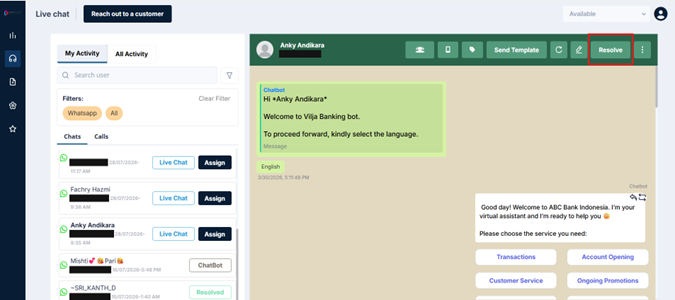
Click the Resolve button in the top-right of the conversation header
-
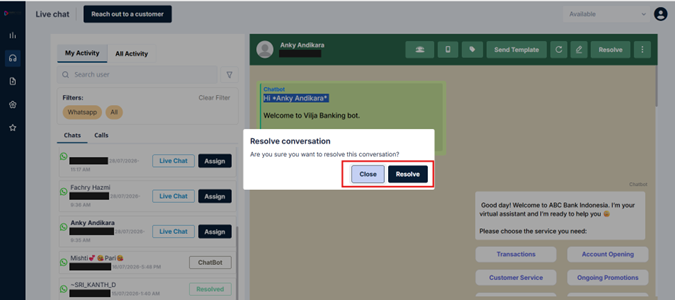
A confirmation prompt appears
-
Confirm the action
Once Resolved
-
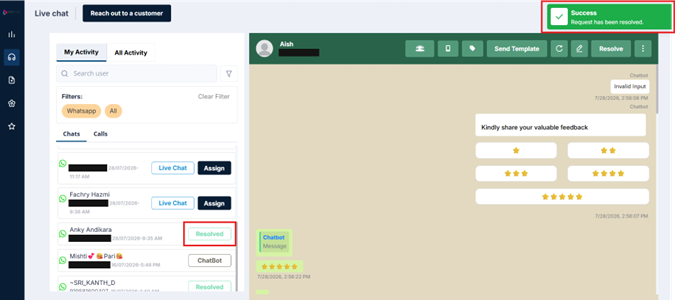
The chat status changes to Resolved and it moves out of your active queue
-
The customer may receive a feedback prompt, asking them to rate the interaction (this depends on your account configuration)
-
A status update appears in the message thread — confirming the conversation has been marked as resolved
-
The conversation remains accessible in your My Activity list when filtered by Resolved
Updated 3 months ago
Did this page help you?